
Simintel AI Studio
AI for your teams.
One studio.
Chat, analyse documents and run shared workflows in one place. Give each team agents built around its work, with people in control of the result.
In your tenant or hosted by Simintel.
 Inside AI Studio Explore the product
Inside the studio
Chat. Analyse.
Run a workflow.
From everyday questions to one-off file checks and repeatable processing, choose the way of working that fits the task. Follow the pointer, or explore each step yourself.
Day-to-day help, in your own voice. Give each agent a defined brief, style and tone. This guide uses Correct grammar to polish a message while keeping its personality. Other examples include Draft a reply for responses in your team's voice and Explain it in plain English for clear explanations. Shape agents around the questions, writing and ideas your team works with.
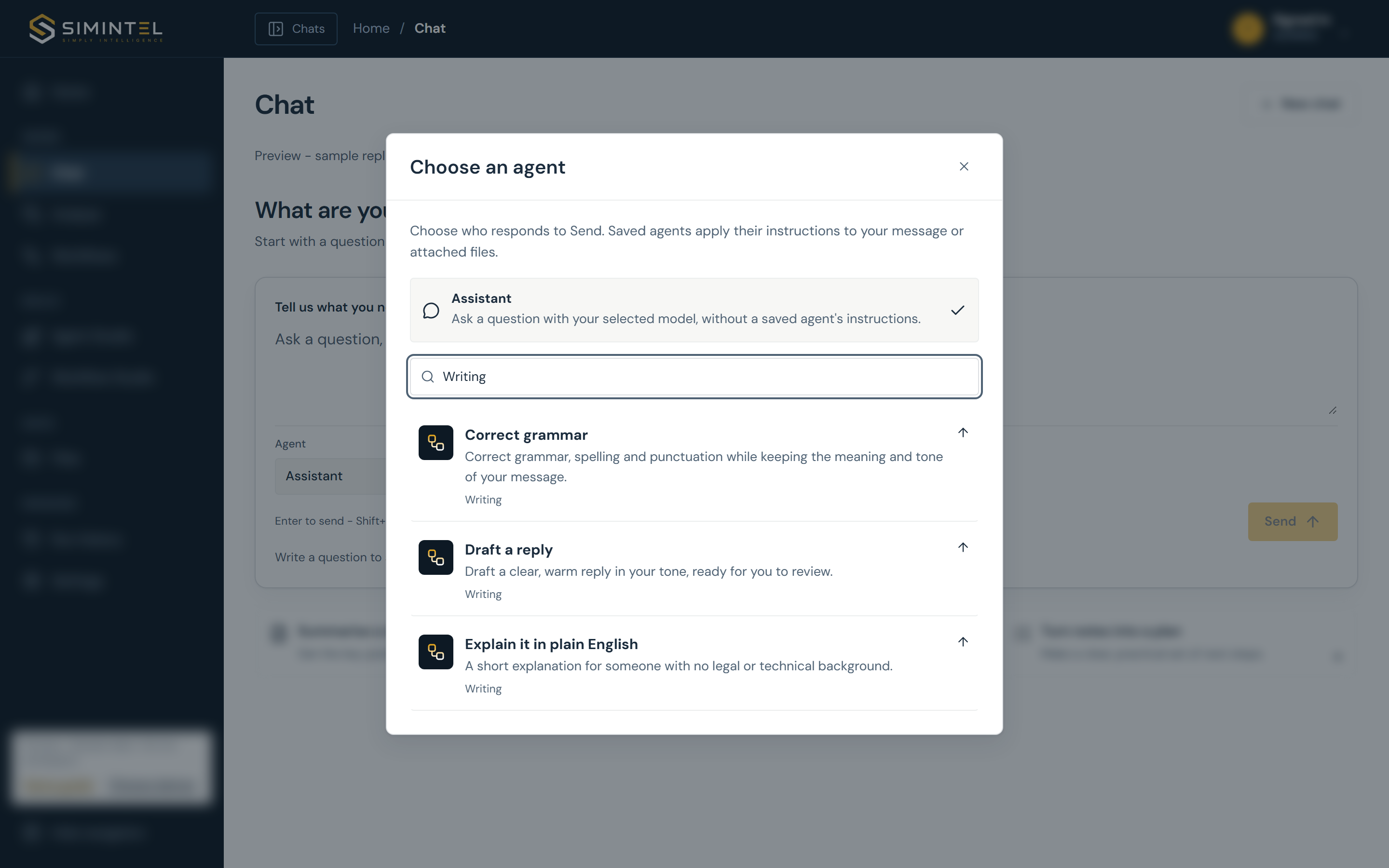
Guided preview with prepared sample answers. Some configuration details are obscured. Arrange a walkthrough to explore the full studio with a task that matters to your team.
For your department
AI for the work
your team repeats.
Answering policy questions, comparing quotes, checking invoices or preparing data. Pick a team to see how a saved agent could help.
The same policy questions keep coming back.
Use the policies HR already works from.
Start with the staff handbook and leave policy so answers refer to your own guidance.
- Staff handbook
- Annual leave policy
- Document
Put this to work for your team.
Tell us how you handle it today. We can explore a useful starting point together.
Illustrative example. Configured around your material.
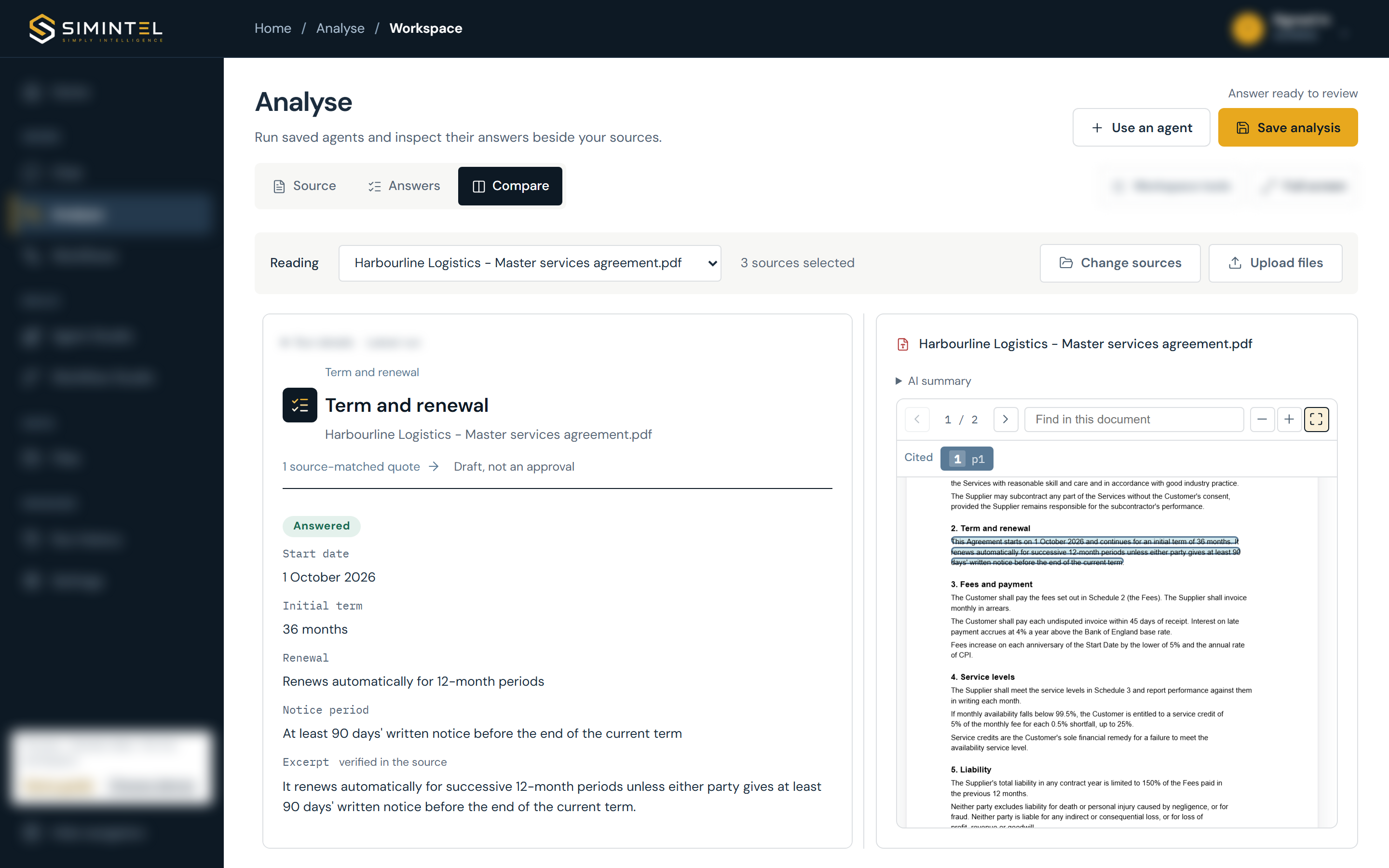
See how source citations workSupplier contract demonstrationBefore you start
A little more detail.
Have a particular task in mind? We can walk through it with you.
Talk to SimintelHow do we start, and what affects the cost?
Start with a conversation about one task and a walkthrough of the relevant product features. We then scope any initial implementation around your sources, agents and review steps. Hosting, model usage, configuration, any integrations and ongoing support shape the cost. We agree the scope and costs with you before the work starts.
Can different departments have their own agents?
Yes. Configure agents around the sources, instructions and answer fields each team needs. Procurement might review supplier terms while Customer Services classifies feedback and drafts replies. We define the agents, review steps and deployment around your use cases, then test them with representative material before rollout.
Are the department examples ready-made applications?
They show the kinds of tasks you can build in the workbench. The product preview demonstrates grammar correction, contract analysis and expense policy review. Other departmental setups are configured and tested around your own material and requirements. Any connections to existing business systems are scoped separately.
Can this bring our existing AI tools together?
The workbench gives common document tasks, agents and repeatable tasks a shared home. We review the tools and tasks you already use, identify what can move into the workbench, and scope any connections that are needed. Specialist applications may still have a role; the aim is a simpler, reusable setup for the work that belongs together.
Do we need to write code to define an agent?
Start by describing the task in ordinary language, then define the answers you need. The workbench can help turn a brief into instructions for you to review. You try the agent on example material before making it ready for use.
What can we work with?
Documents, spreadsheets and structured files, including text-based PDFs, CSV, Excel, text, Markdown and JSON. Databricks tables can also be used in agent runs. Scanned documents need a separate OCR step, which we scope with you.
Can we change models as AI develops?
Agents keep their instructions, inputs and answer structure separate from the chosen model. You can evaluate an approved replacement and test the answers and checks before rollout. Earlier runs retain the configuration used at the time.
How do we roll it out to more staff or more work?
Start with a useful task, test it on representative material and make the agent ready for reuse. Shared processes bring source preparation, agents, review and outputs together. We size model capacity, processing and support for the volume and teams you want to reach.
What does the deployment include?
We agree the hosting option, inference endpoints, access, data handling and support before rollout. The workbench is built around Databricks and can be configured for your tenant or a Simintel-hosted setup. Security and operational responsibilities are scoped for your deployment.
Bring the task.
See the possibilities.
Tell us about one task your team repeats. We can show the relevant parts of the studio and discuss what a first implementation would involve.